 Christian Sass
c10cf59e67
Christian Sass
c10cf59e67
Otter's web app ships no dark mode, and heavy users read transcripts for hours at night. This proposes three shades rather than one, so the choice survives changing lighting instead of being wrong half the day. Contents: - otter-dark.css token set, one block per tier, scoped to :root[data-theme] - preview.html self-contained demo, no build, no network - PREVIEW.png rendered screenshot of the demo - userscript/ Tampermonkey stopgap that works today Contrast figures in the README are measured from the token values with the WCAG 2.1 formula, not estimated. The notable finding is that Otter's brand blue #0b57d0 fails as accent text on every dark surface (2.59:1 to 3.29:1) while remaining correct as a solid fill (6.39:1), so the tokens split accent from accent-fill. MIT licensed. No affiliation with AISense Inc. Co-authored-by: CLU <clu@binaryranch.com> |
||
|---|---|---|
| userscript | ||
| LICENSE | ||
| otter-dark.css | ||
| preview.html | ||
| preview.png | ||
| PROVENANCE.md | ||
| README.md | ||

Otter dark mode
A three-tier dark theme proposal for the Otter.ai web app, plus a working userscript that gives you the same thing today.
Otter's web app has no dark mode. Heavy users read transcripts for hours, frequently at night, and a full-white workspace at 11pm is genuinely painful. This is what a dark theme for it should look like, in three shades rather than one, written so that Otter can adopt it directly.
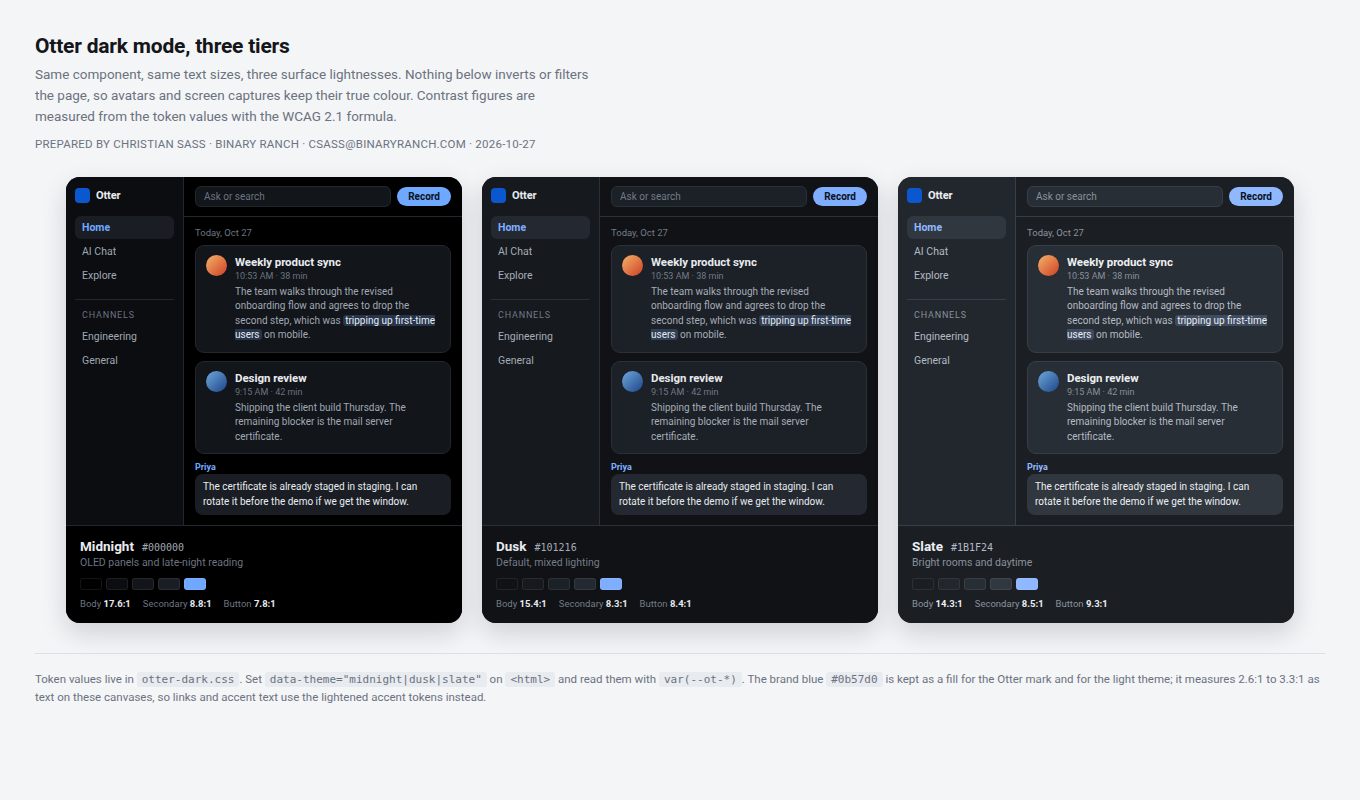
Why three shades instead of one
"Dark mode" is not one design. A pure black UI that feels wonderful at 2am feels like a hole punched in the room at 11am, and a lifted grey that is pleasant at noon reads as muddy at night. Rather than pick one and be wrong half the time, ship the token set three times and let the user choose. The tiers differ only in surface lightness, with text lightness moving with the surface so contrast stays roughly constant across all three.
| Tier | Canvas | Best for |
|---|---|---|
| Midnight | #000000 |
OLED panels, late night |
| Dusk (default) | #101216 |
mixed lighting |
| Slate | #1B1F24 |
bright rooms, daytime |
Measured contrast
WCAG 2.1 ratios computed from the token values, not estimated.
| Tier | Canvas | Body text | Secondary | Tertiary | Accent text | Button label |
|---|---|---|---|---|---|---|
| Midnight | #000000 |
17.56:1 | 8.75:1 | 4.44:1 | 8.72:1 | 7.78:1 |
| Dusk | #101216 |
15.39:1 | 8.29:1 | 4.38:1 | 8.39:1 | 8.39:1 |
| Slate | #1B1F24 |
14.25:1 | 8.49:1 | 5.21:1 | 8.26:1 | 9.34:1 |
Every text pair clears AA (4.5:1) for normal-size text. Body and secondary clear AAA (7:1).
The two things that catch dark themes
The brand blue cannot be reused as text on dark. #0b57d0 measures 3.29:1 on Midnight
and 2.59:1 on Slate. It is correct as a fill (6.39:1 with white text) but unusable as link
or accent text on a dark canvas. The tokens split it: --ot-accent for text, --ot-accent-fill
for solid buttons. The brand blue stays untouched in the light theme.
Borders are decorative, not text. --ot-border lands around 1.4:1 against the canvas,
which is correct. A 1px separator only needs to be perceived, and the 3:1 requirement applies
to UI components that carry meaning, not hairline dividers. Focus rings use the accent and
clear 3:1.
Files
| File | What it is |
|---|---|
preview.html |
Self-contained demo. Any browser, no build, no network. |
otter-dark.css |
The tokens. Set data-theme on <html>, read them with var(--ot-*). |
preview.png |
Screenshot of the demo, three tiers side by side. |
userscript/ |
A Tampermonkey userscript, the stopgap that works today. See below. |
Suggested implementation
- Add the token block from
otter-dark.css, scoped to:root[data-theme]. - Replace hard-coded colours in the workspace shell with
var(--ot-*), starting with the three surfaces, text and borders. The accent is the only one that needs a real design decision per component. - Persist the choice in
localStorage, default it toprefers-color-scheme, and expose it in Settings next to the existing display options. - Set
color-scheme: darkso native scrollbars, form controls and autofill follow.
If a full token migration is too large to schedule, the same palettes can be applied as an overlay stylesheet for the workspace shell only. That covers the bulk of the reading surface, which is where the discomfort is.
About the userscript
userscript/otter-dark-mode.user.js is a different beast, deliberately. It exists because
you cannot ship a fix to someone else's product on a Tuesday afternoon, and waiting for a
feature request to land is not a plan. It inverts the page at the compositor and hue-rotates
it back, with each shade being the same transform at a different invert strength.
Two honest caveats:
- Lifting the black point forces extreme values to clip, so very saturated colours inside images read slightly muted at the lighter shades. Photos are barely affected because they live in the midtones.
- The userscript shades are neutral greys, because an invert cannot produce a tinted surface. The proposal's surfaces are slightly blue-tinted. Same idea, different floor.
The CSS in this repo has neither problem, because nothing in it is a filter.
License
MIT. Take it, adapt it, ship it under your own design system. The tier structure and the accent-versus-fill split are the parts worth keeping; the hex values are interchangeable.
Built by Christian Sass, Binary Ranch. See PROVENANCE.md for the
publication record.