 Christian Sass
e5fc0a1d35
Christian Sass
e5fc0a1d35
Christian's leather patch art is the app icon at 180px and up. It cannot be the favicon: leather grain and stitching turn to mud below 48px, and the pulse is black on brown, which is not enough contrast in a tab bar. So the set is two-tier. Sizes 180 and above come from the leather art; 16, 32, 48 and the .ico come from a flat source whose spike geometry was measured off the original (left tail at 52% height, peak at 42% width, trough at 54%, right tail at 84%). Same colours sampled from the leather body, so the small mark reads as the same object rather than a different logo. make_icons.py gained --small-from for this: one command builds both tiers. Signed-off-by: Christian Sass <csass@binaryranch.com> |
||
|---|---|---|
| .forgejo/workflows | ||
| demo | ||
| docs | ||
| icons | ||
| systemd | ||
| tests | ||
| tools | ||
| .gitignore | ||
| AUTHORS.md | ||
| bookmark.py | ||
| browsers.py | ||
| cdp.py | ||
| CONTRIBUTING.md | ||
| icons.py | ||
| index.html | ||
| install.sh | ||
| labels.json | ||
| LICENSE | ||
| README.md | ||
| server.py | ||
Vitals
A workload map for a browser-shaped computer.
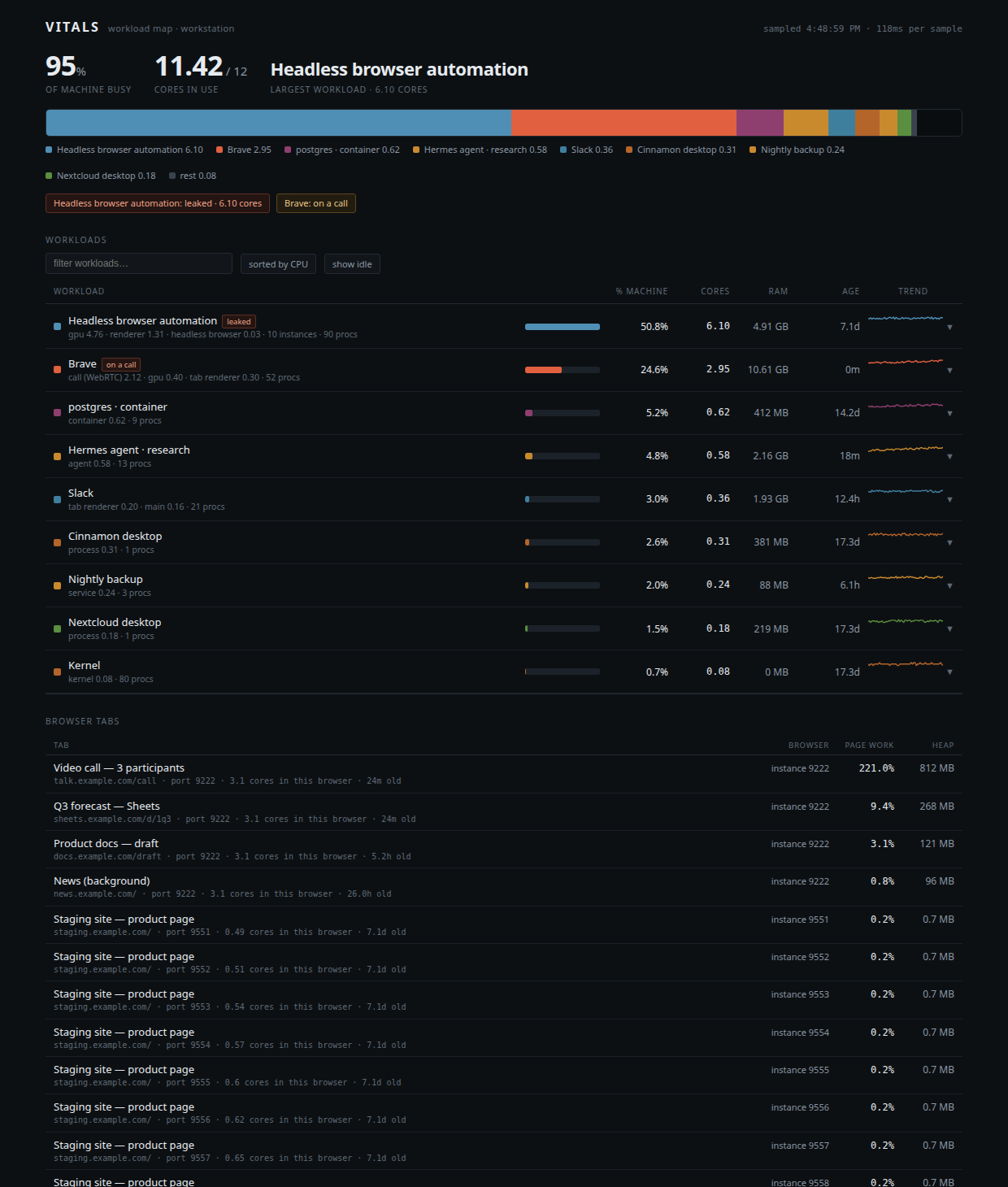
Every process monitor tells you which PID is hot. Nobody thinks in PIDs. Vitals groups processes under the thing a human named — an app, a container, an agent, a browser instance — and then crosses the boundary every other monitor stops at: the browser. Tabs get their own numbers, so you can tell the Excel sheet that is crashing your machine from the video call.
The problem
On a normal desktop, one browser is 40 to 60 processes. GNOME System Monitor
shows them as 60 identical rows named brave, with no age, no parent, and no
idea which one is the tab that is killing you. When ten headless browser
instances leaked from an automation run and sat on a staging page for seven days,
the monitor could not say any of this:
- that they were orphans (their launcher was long dead)
- that they were seven days old
- that their pages were idle while their GPU processes burned six cores
- which instance was which
Vitals answers all four, in one screen, without root.
What it actually measures
Three layers, joined:
1. Identity. Every process is resolved to a human name using the strongest
signal available, in order: docker container, flatpak app id, systemd unit, the
top of its own process tree, or the script it runs. Kernel threads collapse to
one row. labels.json is where you teach it your own names.
2. Tabs. Chrome-family browsers that speak the Chrome DevTools Protocol are
attached per tab. Performance.getMetrics gives main-thread task time, script
time, heap and DOM nodes for each tab. SystemInfo.getProcessInfo gives
per-process CPU where the ids are real PIDs. Joining those two is what makes the
verdict possible.
3. Verdict. A sentence, in English:
pages are idle (0.02 cores of page work) — 6.93 cores burned by browser internals (compositor / raster / media), not by a tab
That is the diagnosis no process list can produce, because the offender is a child process of a browser that owns an idle page.
Units, and why your numbers never matched
System monitors disagree about denominators. GNOME System Monitor reports
percent of the whole machine. top and ps report percent of one core.
The same process is 19% in one and 225% in the other. Vitals shows both, on
the same row, always labeled:
% machine— share of all cores, matches your desktop monitorcores— the fractional core count, matchestop
Quickstart
Requirements: Linux, Python 3.9+, a /proc filesystem. No dependencies, no
root, no agent installed inside your apps.
Want to see it without pointing it at your machine? python3 server.py --demo
serves a canned snapshot at the same URL, which is how the screenshot above was
made.
git clone https://github.com/BinaryRanch/vitals.git
cd vitals
python3 server.py            # http://127.0.0.1:8791
Canonical development happens in Bunkhouse, Binary Ranch's own forge for work built with the community. GitHub is the public mirror. Either clone works, commits land in both.
Optional: run it as a user service so it is either up or reported, never a silently orphaned process.
./install.sh # systemd --user unit, enabled at login
Options: --port N, --host ADDR, VITALS_PORT env var.
The bookmark
install.sh also puts Vitals in your browser's bookmark bar, as a bookmark and
as a popup bookmarklet that opens it in its own window. A tool you have to
remember the URL of does not get used.
Chromium keeps the bookmark model in memory and rewrites the file on its next save, so the browser has to be closed while that write happens. If it is running, install prints the one command to run afterwards instead of failing:
python3 bookmark.py --install            # add bookmark + popup
python3 bookmark.py --install --wait 600 # wait for the browser to exit
python3 bookmark.py --status             # is it there, is the file sane
python3 bookmark.py --remove             # take them back out
The tool recomputes Chromium's bookmark checksum (MD5 over a canonical serialisation of every node) and verifies it after writing, because a file that fails that check leaves the browser showing an empty bar while the file on disk still looks perfect. It keeps a timestamped backup of the file it edited.
Live updates
The sampler runs every 2 seconds, because one sample costs about 400 ms of CPU and a monitor that eats the machine is the joke writing itself. The page polls faster than that and eases between frames, so the numbers move continuously instead of snapping twice a second:
- header values are tabular-width and tweened toward the newest sample
- machine-bar segments are keyed and reordered with flex
order, so their widths actually animate instead of being recreated mid-transition - rows are keyed DOM nodes updated in place, sorted on a 0.1-core grid with the previous order as tiebreak, so a row does not jump position over a hundredth of a core
- a row appears at 0.05 cores but only leaves after it stays under 0.02, so nothing flickers in and out at the threshold
Getting browser tabs
Tabs come from the DevTools Protocol, which a browser only exposes if it was started with a debugging port. Chromium instances launched by automation usually already have one, and Vitals scans ports 9500-9599 automatically. For your own browser, add the flag once:
flatpak kill com.brave.Browser && flatpak run com.brave.Browser --remote-debugging-port=9222
or for Chrome/Chromium:
google-chrome --remote-debugging-port=9222
Tabs restore from session. Without the flag, Vitals still shows the browser's process breakdown, age, memory and per-role CPU. It just cannot name the tabs, and it tells you so instead of guessing.
Security note, stated plainly: a local debugging port lets any local process
drive that browser, including reading cookies for sites it is logged into. It
binds to 127.0.0.1 only, which keeps it off the network, but it is a real
tradeoff on a multi-user machine. Use a dedicated profile if that matters, and
close the browser when you do not need tab-level detail.
Reading the screen
- Machine bar — every core on the box, split by workload. Hover a legend entry to find its row.
- Workload rows — name, roles that are consuming CPU,
% machine,cores, RAM, age, 5-minute trend. Click any row to open its processes and history. - Flags —
leakedmeans reparented to PID 1 and older than an hour, which is the signature of an automation run that died without cleaning up.on a callmeans a WebRTC renderer is actually burning, not merely present. - Browser tabs — every tab from every DevTools-speaking browser, sorted by page work, with the owning browser instance, its port, its age, and how many cores that whole instance is using. The gap between those two numbers is the whole point.
What it deliberately does not do
- No root, no eBPF, no agents. It reads
/proc,cgroup,flatpak ps,docker ps,ssandwmctrl. Everything else is arithmetic. - No killing. Vitals reports. Reaping is a separate, explicit action.
- No history beyond five minutes in memory. Nothing is written to disk.
- No guessing about tabs. If a browser has no debugging port, its tabs are unknown, and the UI says so.
Limitations
/proc/<pid>/fd and /proc/<pid>/io require ptrace permission, so socket and
file attribution is limited to what ss reports. Per-tab GPU cost is inferred
from the instance's process breakdown rather than attributed per tab, because
Chromium does not expose that mapping over CDP. Kernel-thread grouping is
coarse by design.
Roadmap
- reaping leaked browser instances from the UI, with the age and orphan evidence shown before the button
- persisted history, so a spike at 03:00 is still there at 09:00
- per-tab process attribution via
Target.getTargetInfowhere the platform allows it - a second adapter for non-Chromium browsers through their own remote protocols
- macOS and BSD sampling backends, same model
Authorship
Built by Christian Sass (product direction, requirements, and the observation
that the browser is the top layer of the operating system) and CLU (architecture
and implementation). Details in AUTHORS.md. Commits carry a
Co-developed-with trailer.
License
MIT. See LICENSE.